
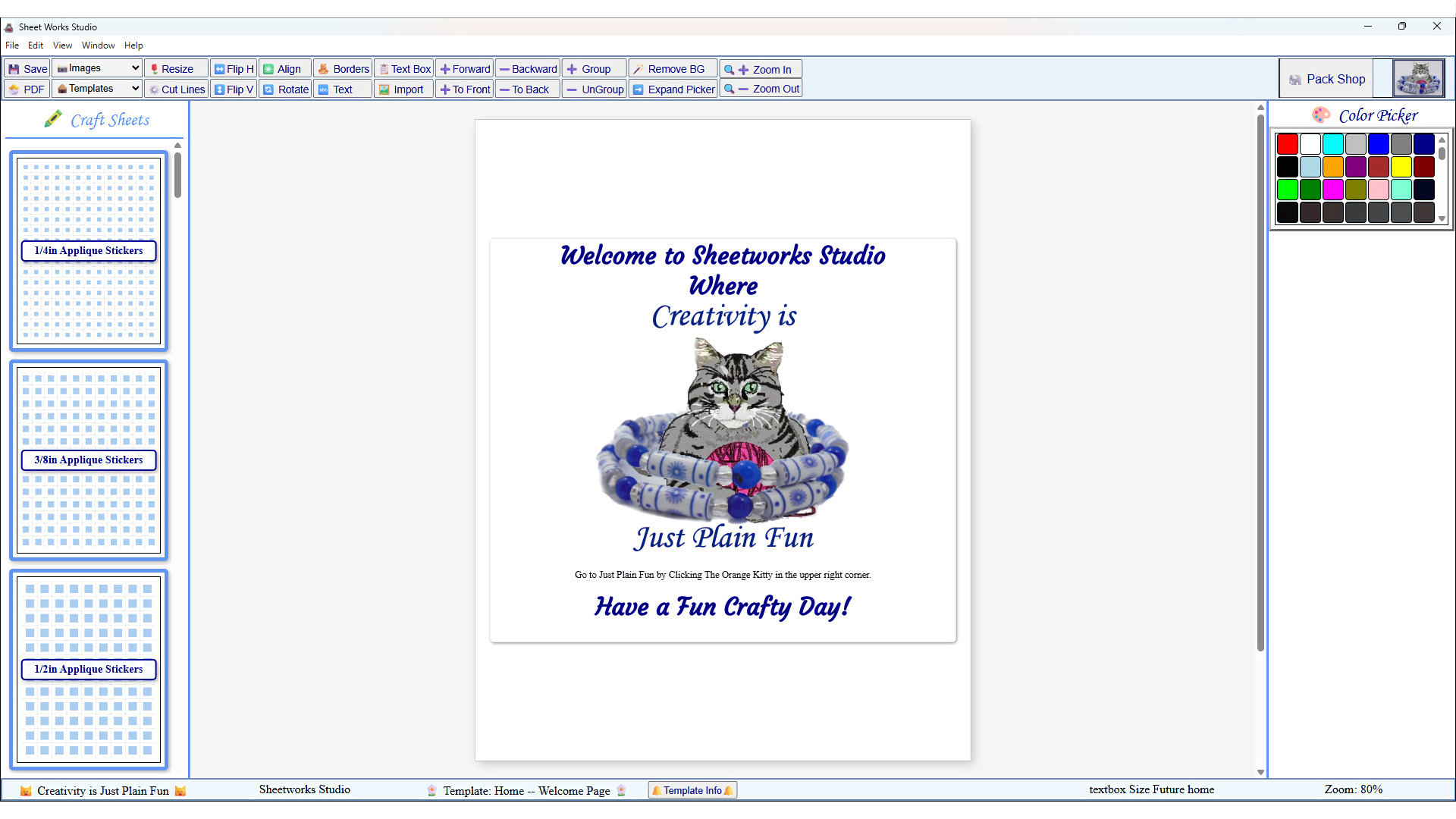
The Base App
This is what the app looks like upon loading after the splash screen goes away. View Larger
✨ Template System Update
Sheetworks Studio now uses a modern, modular template system designed for smooth expansion. Every template is released individually and includes category metadata so the app can organize everything automatically and keep your workspace tidy.
What This Means for You
- Individual Free Templates: All templates are provided one at a time so you can install only what you want, when you want.
- Automatic Organization: Each template includes category metadata (such as Designer Sheets), allowing the app to place it in the correct section automatically.
- Simple Installation: Templates are delivered as ZIP files and can be imported directly through the app—no manual folder management required.
- Important Compatibility Note: New templates can be imported into older versions of Sheetworks Studio, but versions 2.6 and earlier cannot open them. They will appear in the template list, but tapping them will not load anything. Updating to the latest version ensures all new templates open and function correctly.
- Recommended: For full compatibility and correct behavior, please download the latest version of Sheetworks Studio. Importing templates is the only feature that requires registration.
For Existing Users
Sheetworks Studio now includes three built‑in templates in the Hearts Galore category, ready to use as soon as you install the app. Additional Hearts Galore templates will be available on the website for free download, and you can import them at any time.
Several other shape categories also include three templates each inside the app, with more free templates being introduced over time. All downloadable templates can be imported through the app, but versions 2.6 and earlier cannot open the new templates. In older versions, imported templates will appear in the list with their title, but the preview image and the template page will remain blank because the older system cannot locate the new template structure.
For full compatibility and correct behavior, please download the latest version of Sheetworks Studio. Importing templates is the only feature that requires registration.
Single Templates are also ZIP files. Download the ZIP file to your computer, but do not unzip or rename it. After installing and opening the app, go to File → Import New Template in the menu. Choose the ZIP file you downloaded, and the app will install the pack automatically. All future templates you may purchase, will be imported exactly the same way.
Thank you for supporting Sheetworks Studio as it grows into a flexible, expandable template ecosystem. This update makes it easier for me to release new templates more often — and easier for you to collect the ones you love.
Sheetworks Studio
The First-of-Its-Kind Paper Bead Making Software
Designed for makers who want fast, precise, frustration‑free bead sheets.
Sheetworks Studio has officially returned! After a month of steady work, improvements and new features, this new version is cleaner, easier to use, and ready for you to explore.
Sheetworks Studio is a downloadable Windows app that lets you design and print paper bead templates with clarity and ease.
Click to Learn MoreYou can registger later for $100.00 if you want to import the free templates.
Register Sheetworks Studio
Purchase a license for Sheetworks Studio. After payment, your registration code will be emailed automatically.
Please download and explore Sheetworks Studio before registering. All purchases are final.
Sheetworks Studio is a one‑time purchase of $100 — yes, really! No monthly fees, no subscriptions, and no recurring charges of any kind. All templates released for Sheetworks Studio are free to download and can be imported directly into the app. Because you can fully download, install, and explore the app before registering, all purchases are final and non‑refundable.
- Download setupSheetworksStudio.zip
Save the ZIP file to your computer. - Extract the ZIP
Right‑click the ZIP → Extract All… - Open the extracted folder
Inside you will see SetupSheetworksStudio.exe. - Run the installer
Double‑click SetupSheetworks.exe. Sheetworks Studio will install itself into Program Files like any standard Windows application. - Launch Sheetworks Studio
After installation, open Sheetworks Studio from your Start Menu or desktop shortcut.
Windows SmartScreen Reminder
When you run SetupSheetworks.exe, Windows may show a blue SmartScreen window saying the app is from an unknown publisher.
This is normal for new software.
Click More info → Run anyway to continue the installation.
All items in our online shop ship free within the US only. I currently offer U.S. shipping only and it is from rural Maine. Delivery can vary from 2–14 days depending on your distance from Maine. Expedited shipping is not available.
Please note: I am now selling all of my paper bead making tools and other items from this web site using Paypal payments.
I have removed all of my paper bead making tools from Amazon. My Kindle crochet pattern books and paper template paperback books continue to be available on Amazon, as they are printed and fulfilled directly by Amazon. A limited number of paper bead making tools remain available on Etsy but I am not linking to those tools from this site.
Random Quick Tip!
Fancy Gift BreadsIf you have a bread machine, don't forget to make some great gifts of breads and fancy coffee cakes for your friends. It is so much nicer to let the machine do your mixing for you so you can do other things.
